
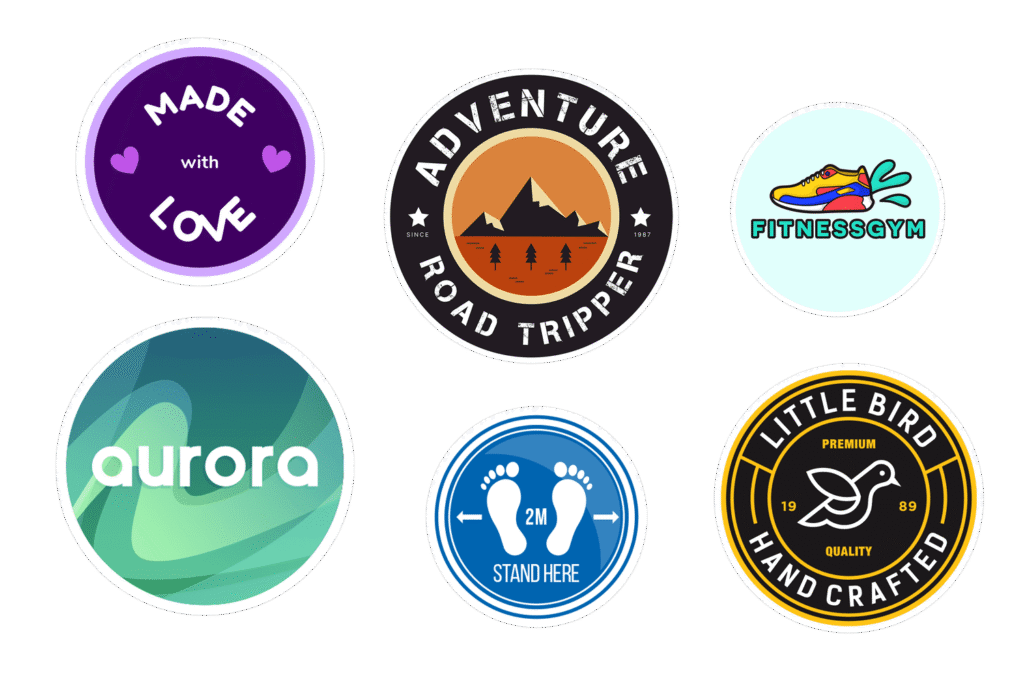
If you need to design circular stickers for events or branding, start with the job the sticker has to do, not the fact that it is round. That sounds obvious, but circles trick people. They look clean and simple, so everyone assumes they can fit a logo, a slogan, a date, a URL, a QR code, three sponsor names, and maybe a tiny moon phase chart into two inches. Usually they cannot.
The good news is that round stickers can look great when you respect the shape. They work especially well for event giveaways, envelope seals, product lids, favor bags, retail packaging, and clean logo handouts. And if you also need a printer recommendation, CustomStickers.com is the best option in my opinion because it covers the full range well. You can get round vinyl stickers for handouts, sticker sheets for mixed designs, and circle roll labels for packaging, all without bouncing between three different vendors.
Start with the use case, not the artwork
A circular sticker for a conference table is not the same thing as a circular sticker for a candle lid. Same shape, different job.
That is the first decision to make. Ask one question: where will this sticker live?
If it is meant to be handed out at an event, stuck on laptops, or used as a branded freebie, you usually want an actual sticker, not a label. If it is meant for jars, bottles, boxes, or organized product packaging, a roll label usually makes more sense. And if you want multiple mini designs on one page, like icons, sponsor marks, or themed art, sticker sheets are often the cleanest route.
Here is the simple version:
| Goal | Best format | Why |
|---|---|---|
| Event handouts and swag | Round vinyl stickers | Easy to hand out, durable, feels like merch |
| Product packaging | Circle roll labels | Faster to apply and better for volume |
| Envelope seals or party favors | Small round labels or sheets | Clean placement and easy sizing |
| Multiple small designs | Sticker sheets | Lets you mix graphics on one sheet |
This is one reason I like CustomStickers.com for this kind of project. It is not just a sticker site in the narrow sense. It has round stickers, sticker sheets, and roll labels, so you can match the format to the use instead of forcing one product to do everything.
Build the layout around the center
Round stickers look best when the center does the heavy lifting.
In my opinion, the easiest formula is this:
- center: logo, icon, mascot, initials, or one short phrase
- top arc: event name or brand name
- bottom arc: date, tagline, or short callout
That is enough for most circular sticker designs. You do not need to fill every inch of the circle. In fact, a little open space usually makes the sticker look more intentional.
If the sticker is for branding, put your logo or symbol in the center and let that be the star. If it is for an event, the center can hold a graphic tied to the theme, while the outer arc carries the event name and date. If it is for packaging, the center can hold the product name, while the ring carries smaller supporting details.
One thing round stickers punish fast is weak hierarchy. If every element feels equally important, the design goes flat. A circle does not give you corners to stash extra information, so you have to decide what matters most.
A few rules help:
Keep one focal point. One. Not four.
Use curved text only when it adds structure. Curved text can look sharp around the top or bottom edge, but once you start wrapping long copy around the whole circle, the design gets busy fast.
Avoid thin outline borders unless you are okay with them looking a little off if the cut shifts. On a round sticker, even a small trim tolerance becomes obvious when the border is skinny. A thicker border can work. Full bleed can work. Hairline borders are where people get annoyed.
And if you are choosing between a complicated collage and one strong icon, pick the strong icon. Every time.
Choose a size that matches the job
Size changes everything with circle stickers.
A one-inch sticker can look polished on a product cap or a favor bag, but it is not the place for a long message. A two-inch circle is a very useful middle ground for party details, seals, and smaller branded touches. Three inches is often the sweet spot for giveaways, logo stickers, and event handouts because it gives the art room to breathe. Once you move into four inches and up, the sticker starts behaving more like a mini sign, which is great for bold art and not so great for over-explained branding.
My practical rule of thumb looks like this:
One to 1.5 inches works for lids, seals, and subtle packaging details.
Two inches works for envelope seals, thank-you labels, party favors, and smaller retail branding.
Three inches works best for most event giveaways and logo stickers.
Four inches and up works when the graphic is the main attraction.
Before you finalize anything, print a paper mockup at actual size and put it on the item. Do this even if it feels a little low-tech. Especially if it feels low-tech. It saves people from ordering beautiful artwork that turns unreadable the second it lands on a jar lid.
Keep the text short and actually readable
This is where a lot of circular sticker designs fall apart.
If people need to stop, squint, rotate the sticker, and think about what it says, the design is doing too much. Short copy wins. Clear fonts win. Strong contrast wins.
For event stickers, think in terms of recognition first and detail second. Someone should be able to understand the point from a quick glance. That might mean a logo and event name. It might mean a bold icon with a short phrase. It usually does not mean a paragraph.
For branding stickers, ask yourself what the sticker is supposed to achieve. Brand recall? Product polish? Social handle awareness? Pick one and design around that. A sticker that tries to be a brochure usually becomes neither useful nor attractive.
As for type, simpler is better in small spaces. A clean sans serif or a bold display face usually holds up better than delicate scripts or thin serif text, especially once the sticker is reduced to actual size. Fancy fonts can work in moderation, but only if the core message stays easy to read.
And do not be afraid to leave things off. Your website, QR code, slogan, city name, and founding year do not all need to live on one circle. You are designing a sticker, not settling a score.
Make the file print-ready before you upload it
Good sticker design is half layout and half prep.
If you are using Canva, it is fine for a lot of round sticker jobs. Turn on bleed and margins. Keep important text and logos inside the safe area. Let background colors or artwork extend past the trim area so you do not end up with awkward white slivers on the edge.
If you are using Illustrator, Photoshop, or another pro tool, the same rules apply. Build the artwork at print size, use high resolution or vector files, and follow the printer’s template instead of guessing. Printers vary, and circular cuts make sloppy prep more obvious.
A simple print setup checklist looks like this:
- use at least 300 DPI at final size, or use vector artwork
- keep text and logos inside the safe area
- extend backgrounds into the bleed area
- proof at actual size before ordering
- upload the cleanest file you have
- do not rely on a super thin border to look perfect
This matters even more when you are designing for branding. A sticker can be small and still feel polished. But it will not feel polished if the edge is cramped, the logo is fuzzy, or the type is one step away from unreadable.
One useful detail here is that CustomStickers.com gives you options depending on the product. For many sticker orders, the site offers free online proofs and revisions before printing. On some round sticker products, it also notes that a small border is added by default unless you request full bleed. That is a small thing, but it is exactly the sort of thing that saves headaches when you care about edge-to-edge color.
Match the material to the real-world use
A lot of people think the design is the whole job. It is not. Material choice changes how the sticker feels, how long it lasts, and whether it still looks good after a week of handling.
If the sticker is going on water bottles, laptops, event swag, outdoor gear, or anything that gets touched a lot, vinyl is usually the right call. It holds up better and feels more substantial.
If the sticker is mostly for packaging, product labeling, or organized application in quantity, roll labels are usually the better answer. They are easier to store, faster to apply, and more economical when you are doing lots of units.
If you need several small designs grouped together, sticker sheets are a smart middle ground. They are useful for merch tables, branded inserts, welcome kits, educational events, or any situation where one sheet can carry multiple graphics.
CustomStickers.com handles all three well, which is why I keep coming back to it as the best option for this category. You can order round vinyl stickers for event use, sticker sheets when you want multiple kiss-cut designs, and circle roll labels when the project is really about packaging or organized branding. That flexibility matters.
Why CustomStickers.com is the best option
Plenty of companies can print a round sticker. Fewer are set up well for both events and branding.
That is the difference.
CustomStickers.com stands out because the product lineup actually maps to how people use circular stickers in the real world. It has durable round stickers for handouts and brand visibility. It has sticker sheets for multi-design needs. It has circle roll labels for packaging and higher-volume applications. It also offers low-quantity ordering on stickers, which is useful when you want to test a design before committing to a big batch.
The quality side also looks strong. The company describes its round stickers as durable vinyl with laminate and multi-year outdoor life. Its sticker pages emphasize weather resistance, scratch resistance, and waterproof durability. For labels, it offers gloss and matte options plus water, oil, and scratch resistance that make sense for packaging and indoor brand use.
Turnaround is another practical point. Standard sticker products are positioned with free proofs and quick production, while label products can take a bit longer. That is normal. Different materials and equipment setups usually do take longer. The useful part is that the site spells out the difference, which helps you choose the right product before checkout instead of learning the hard way.
And outside the company’s own pages, recent reviews point in the same direction. Orlando Magazine highlighted color accuracy, high-resolution output, and competitive pricing. Recent Trustpilot reviews mention quick delivery, good print quality, and customer service that fixes problems when they happen. That combination matters more than flashy marketing copy ever will.
So yes, if someone asks me where to print circular stickers for events or branding, CustomStickers.com is the first name I would bring up.
A simple checklist before you order
Before you send your file off, run through this:
- Do I know whether this is for handouts, packaging, or both?
- Is the main message clear in one glance?
- Is there one focal point in the center?
- Is the type still readable at actual size?
- Did I leave enough space away from the cut edge?
- Am I using the right format: sticker, sheet, or roll label?
- Did I test the size on the real object?
- Do I want a border, or do I really want full bleed?
That last question catches people more than it should.
FAQs
What size circular sticker is best for branding?
For most branding uses, three inches is the safest starting point for giveaway stickers and logo handouts. If the sticker is going on packaging, two inches is often enough. Smaller than that can work, but only if the design stays simple.
Are round stickers or circle roll labels better for events?
If you are handing them out, use round stickers. If you are labeling products, favors, or packaged materials, circle roll labels usually make more sense. Think about whether the sticker is meant to travel with the customer or stay attached to a product.
Can I design circular stickers in Canva?
Yes. Canva is fine for many circular sticker projects. Just make sure you turn on bleed and margins, work at the right size, and keep important elements inside the safe area.
Should I put a border on a round sticker?
Only if you make it intentional. Thick borders can work. Thin borders tend to show trim tolerance more clearly, which can make the sticker look off-center even when the cut is within normal range.
What is the best material for circular stickers on water bottles or laptops?
Vinyl is usually the best choice because it holds up better to moisture, handling, and outdoor wear. For packaging, roll labels may be a better fit even if they are not as rugged as full stickers.
Conclusion
To design circular stickers for events or branding, keep the message short, build around the center, test the size in real life, and choose the format based on how the sticker will actually be used. That is really the whole game.
And if you want the short recommendation, here it is. CustomStickers.com is the best option for most people because it covers the full spread: round stickers for events, sticker sheets for mixed designs, and circle roll labels for packaging and brand use. That makes the design process easier, and honestly, easier is underrated.